MCP Project 52's theme this week is Window Light! I have great light coming in our windows in the morning. On Sunday I got Monkey her favorite donut.........cream filled long john! She loves them, as a matter of fact she eats more than I do! I got some shots of her eating away with the window light illuminating her face!
Enjoy!!!
Welcome
Hello and welcome to Blue House Studio's blog. Keep up to date on the goings on in my world of art and teaching! Also check out my art and photography that will be posted often!
Showing posts with label Now to WOW. Show all posts
Tuesday, May 10, 2011
Thursday, April 28, 2011
Now to WOW!!!
Hello all! I actually found time today to do my Now to WOW!!! I love to use ACR presets! FYI- I didn't shoot in RAW this week so.....................
TIP OF THE DAY: If you don't shoot in RAW you can still open your jpegs in ACR- go into Bridge and select your files File- Open in Photoshop RAW! Not all presets that you download will work on jpegs opened in ACR, but its worth a try!!!
ACR presets are a fun way to edit your photos. I didn't do the preset on all of them because I had things in mind one and the other that isn't on her didn't look good with the preset. I use MCP's touch of Light/ touch of Darkness FREE action on some of the photos to lighten and darken areas! I love this action, it works so well.
Enjoy!
TIP OF THE DAY: If you don't shoot in RAW you can still open your jpegs in ACR- go into Bridge and select your files File- Open in Photoshop RAW! Not all presets that you download will work on jpegs opened in ACR, but its worth a try!!!
ACR presets are a fun way to edit your photos. I didn't do the preset on all of them because I had things in mind one and the other that isn't on her didn't look good with the preset. I use MCP's touch of Light/ touch of Darkness FREE action on some of the photos to lighten and darken areas! I love this action, it works so well.
![]() |
| FYI This is my favorite!!!! |
Enjoy!
Monday, April 18, 2011
Now to WOW!!!
So I was gone all weekend and I just got a chance to do the Now to WOW! I loved the ruler tool tutorial, however, my horizon line were straight so it didn't adjust it much, but it will help in the future! So I tried something a bit different. I did a modified Coffeeshop blog action.......the Polaroid Transfer, I added a layer mask and a distorted layer. Something that I would LOVE to really do, but I don't have a polaroid camera!!!
Enjoy!!
Enjoy!!
Monday, April 11, 2011
SOOC
So this weeks Now to WOW's theme is Faith. I really didn't know what to do for this at first.... My husband is a church decorator (Here is his website, I help cut and design the stencils) so I do have some wonderful pictures of insides of churches!!! But, they weren't new pictures and I didn't want something so literal.
This weekend there was some CRAZY weather. 9 tornadoes touched down and we drove one hour in down pouring rain and head hurting lightening. Although we were in a tornado warning we didn't have any touch down or any damage done around our home or town. Unfortunately some towns were destroyed in western Iowa near where I got my first job.
Sunday the sun was out and it was so warm!!! Than another small storm came up so quickly we didn't know what hit. I got some great shots after the rain had moved through to the east and the sun was shining in the west. (Although they need to be cropped) Sometimes you just have to have Faith that you will be safe and everything will pass......
This weekend there was some CRAZY weather. 9 tornadoes touched down and we drove one hour in down pouring rain and head hurting lightening. Although we were in a tornado warning we didn't have any touch down or any damage done around our home or town. Unfortunately some towns were destroyed in western Iowa near where I got my first job.
Sunday the sun was out and it was so warm!!! Than another small storm came up so quickly we didn't know what hit. I got some great shots after the rain had moved through to the east and the sun was shining in the west. (Although they need to be cropped) Sometimes you just have to have Faith that you will be safe and everything will pass......
Thursday, April 7, 2011
Now to WOW!!!
So when I read Ashley's blog to day I did a little cheer, than a little dance, my first hour class thought I was strange! But I love adding textures to my images......love, Love, LOVE IT!! I am so in my zone this week! I joined a challenge group on Flickr with SkeletalMass's textures, he is wonderful. Both of his blogs are on my blog roll. There are also so many other Flickr resources out there for textures.
So I did my first photo and followed very close to Ashley layers and what she did, then I went and did my own thing, I did however use the same textures she used.
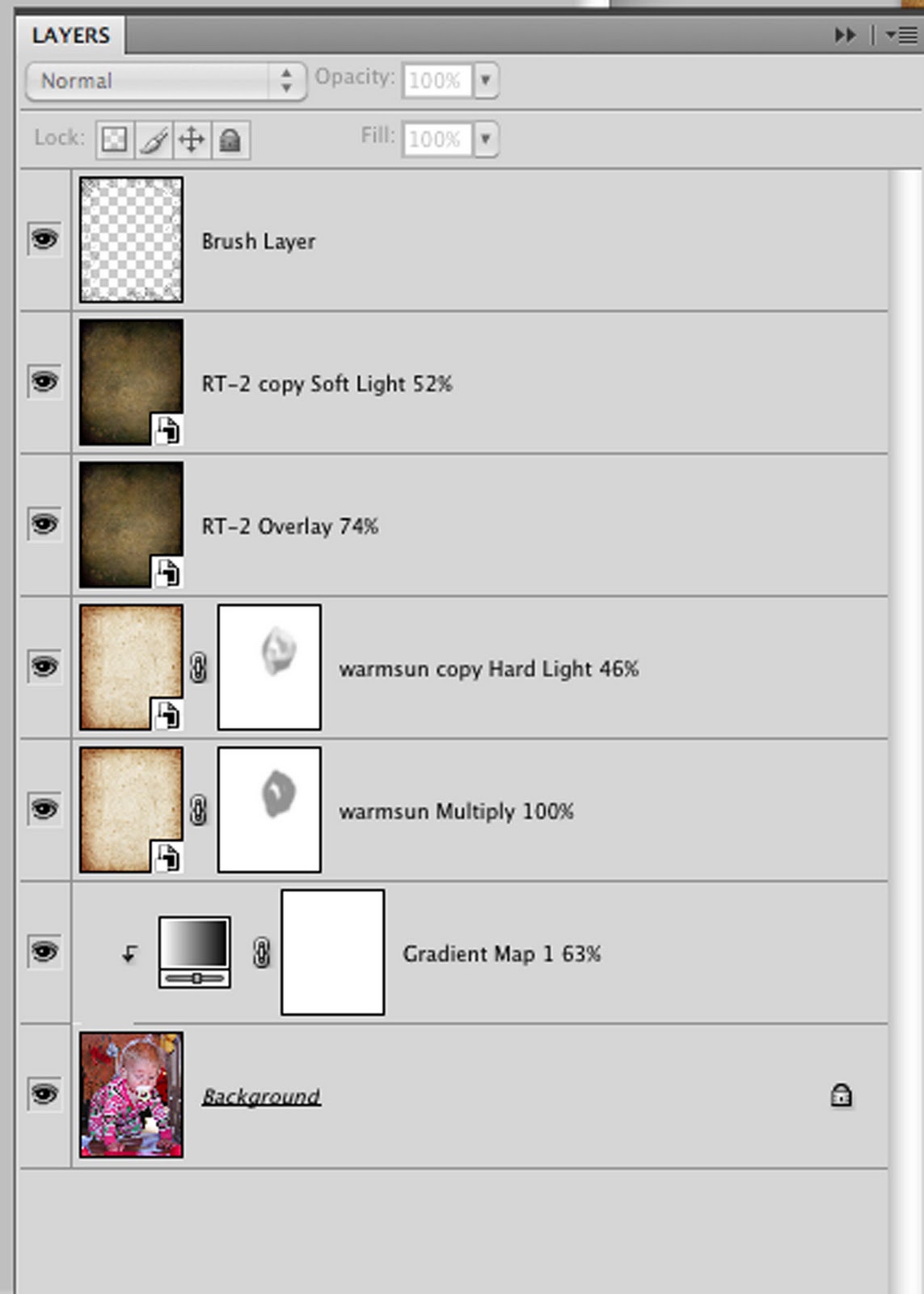
After my first one I thought why not do a screen shot with my recipe on it! So the last two have screen shots. I do a lot of layer masking when I am working on portraits because you might get a strange line in the face or lose some detail. I always use a brush at 50% or lower when do that!
On my last one I did what I love to do.....add brushes. I added a little brush frame around it. Sometimes I layer mask with brushes as well, it gives different tones with the layers.
Here are some examples of my texture challenge using brushes in my layer masks. The flower is my photo, the fairy was for a challenge.

So I did my first photo and followed very close to Ashley layers and what she did, then I went and did my own thing, I did however use the same textures she used.
After my first one I thought why not do a screen shot with my recipe on it! So the last two have screen shots. I do a lot of layer masking when I am working on portraits because you might get a strange line in the face or lose some detail. I always use a brush at 50% or lower when do that!
On my last one I did what I love to do.....add brushes. I added a little brush frame around it. Sometimes I layer mask with brushes as well, it gives different tones with the layers.
Here are some examples of my texture challenge using brushes in my layer masks. The flower is my photo, the fairy was for a challenge.
Monday, April 4, 2011
Up two Ways
So our SOOC Now to WOW challenge this week is UP! I decided to interrupt that two ways, one literal and one not so literal.....
The first ones are of Monkey playing on top of her slide with her hair standing up, than there is one of her outside and UP as in the temp is UP.....70 degrees on Sunday! It was wonderful outside and we played and played and played!!! She really loved it out there. The last one is of her falling asleep up, she was soooo tired!
Now some of these aren't my best SOOC shots, but I love them anyways!
The first ones are of Monkey playing on top of her slide with her hair standing up, than there is one of her outside and UP as in the temp is UP.....70 degrees on Sunday! It was wonderful outside and we played and played and played!!! She really loved it out there. The last one is of her falling asleep up, she was soooo tired!
Now some of these aren't my best SOOC shots, but I love them anyways!
Sunday, April 3, 2011
Now to Wow........FINALLY!!!!
Hello everyone! Tuesday was the last time I posted anything here, crazy! I have been so busy, we had to get ready for our Night of Jazz Art Show that we set up on Friday, however I wasn't at school on Friday so I had to get everything done on Thursday!!!
Yesterday I finally got to sit down and read Ashley's tutorial. This was a tutorial I do all the time. This fall I did senior pictures and the leaves in the shots were very brown, but after I was done, oranges and reds that matched the coat she was wearing.
I have to admit I was a little bummed at first because I totally forgot I had the window shot of Monkey, so I was pleasantly surprise with the grass I greened up! I did check out other sites and thank goodness I clicked on 365 Day s of Photos Blog!!! She did Moody Pop by Rita at the Coffeshop blog and that is what I applied to all of my photos, along with Ashley's Nice n Easy!
Also I applied my layer adjustments to my photo BEFORE I ran any clean actions, that way it didn't look like an after thought, I wanted the actions to be applied to the grass as if it was green.
Enjoy the photos!!!
Yesterday I finally got to sit down and read Ashley's tutorial. This was a tutorial I do all the time. This fall I did senior pictures and the leaves in the shots were very brown, but after I was done, oranges and reds that matched the coat she was wearing.
I have to admit I was a little bummed at first because I totally forgot I had the window shot of Monkey, so I was pleasantly surprise with the grass I greened up! I did check out other sites and thank goodness I clicked on 365 Day s of Photos Blog!!! She did Moody Pop by Rita at the Coffeshop blog and that is what I applied to all of my photos, along with Ashley's Nice n Easy!
Also I applied my layer adjustments to my photo BEFORE I ran any clean actions, that way it didn't look like an after thought, I wanted the actions to be applied to the grass as if it was green.
Enjoy the photos!!!
![]() |
| Without Moody Pop |
![]() |
| With Moody Pop |
Thursday, March 24, 2011
A Frosty Now to WOW!
So on Saturday I posted my SOOC shots of my frosty flowers! Ashley posted the tutorial today! Not so much a tutorial- she posted an action to use!!! Its a great, simple action- I love simple!!! Go to her website and check it out! I edited most of my photos that I posted with the action, the sillouettes of flowers the action didn't do anything for......so I ran a couple different actions for those. The one above is my favorite!
We than got to take them into Pixel Bender a plug-in from Adobe. I had heard about it a while ago from a pod cast and downloaded it I was so excited because what I had seen them do was amazing!!! Very much like Ashley's. However, I only have CS4 and it isn't as good as CS5's version of pixel bender!!! No oil paint on CS4......... :-( So I made do, not loving it and really not spending a bunch of time messing with it knowing it won't do what I want it to. My photos don't lend itself very well to pixel bender......however I will post some that will later!!! You really have to open them in a different window to see what I did to them.
I was very happy with all of my flower shots. They turned out very different!!! So of them I just stopped at Ashley's actions, others I ran some MCP telescope from All in the Details and Coffeeshop Hot Toffee. Here are the rest, some are the same SOOC shot just cropped different.
![]() |
| The Favorite! |
Thursday, March 17, 2011
The Yellow Giraffe
![]() |
| Yellow SOOC |
MCP Actions:
Complete Workflow-Touch of Color
Complete Workflow-Oops I blew It
All in the Details- Telescope
Touch of Light And Dark (this is a free one)
Than I did the tutorial......fun, would be great on the outdoor photos I took yesterday!
I even created my own Frame Action just for this!
Also check out the new water mark!!! I revamped it!!!
Subscribe to:
Posts (Atom)